Troubleshooting
Problem
Cannot close the "Change Status" dialog box after getting error when changing the status of an Invoice record.
Resolving The Problem
Steps to replicate:
1. Go to the Invoices application
2. Try to change the status of a record to APPR. Ensure that the approval fails for some reason (i.e. if quantities do not match).
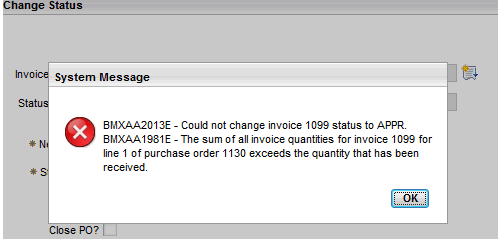
3. When clicking OK, it will go back to the "Change Status" dialog box. But all fields are greyed-out.
Clicking on buttons is also not working. So the "Change Status" dialog box cannot be closed.

Resolution:
To fix this issue, export invoice.xml from the Application Designer.
Find <dialog beanclass="psdi.webclient.beans.common.ChangeStatusBean" id="STATUS".
In this dialog section, change below
<pushbutton default="true" id="changestatus_2_1" label="OK" mxevent="dolongop"/>
to
<pushbutton default="true" id="changestatus_2_1" label="OK" mxevent="dialogok"/>
Then import invoice.xml.
The problem will be fixed. The Change Status dialog box can now be closed even if you get an error when changing statuses for Invoice records.
Was this topic helpful?
Document Information
Modified date:
17 June 2018
UID
swg21624012