Troubleshooting
Problem
Using IBM Real-Time Asset Locator (RTAL)., alerts are sent to the Asset Visibility Client (AVC) regardless of the classification.
Symptom
Alerts are sent to the AVC when they should be suppressed. The AVC may also report an incorrect class for an asset.
Cause
Alerts are generated even when the classification and rules are setup to suppress the alert. This is caused by a missing field in a Maximo object structure that is used by RTAL.
Diagnosing The Problem
Resolving The Problem
Adding a field to an object structure in Maximo that is used by RTAL should resolve the problem. Follow the instructions below to add the field.
- On the Maximo web console, go to Integration -> Object Structures
- Enter 'mxclassification' in the list, press Enter, and then click on the MXCLASSIFICATION object structure.
- From the drop-down box, select Exclude/Include Fields
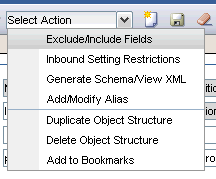
- Make sure CLASSSTRUCTUREUID is NOT checked

- Press OK and save the object structure.
- Restart WSE to clear the cache
- Verify the problem is resolved.
[{"Product":{"code":"SSB2NL","label":"IBM Real-Time Asset Locator"},"Business Unit":{"code":"BU059","label":"IBM Software w\/o TPS"},"Component":"Real-Time Asset Locator","Platform":[{"code":"PF002","label":"AIX"},{"code":"PF016","label":"Linux"},{"code":"PF033","label":"Windows"}],"Version":"7.1","Edition":"","Line of Business":{"code":"LOB59","label":"Sustainability Software"}}]
Product Synonym
RTAL
Was this topic helpful?
Document Information
Modified date:
17 June 2018
UID
swg21606241