Troubleshooting
Problem
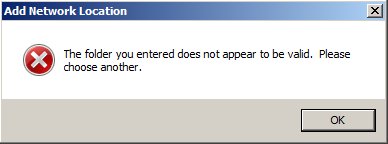
Attempts to connect to the WebDAV using Microsoft Windows 7 or Windows 2008 result in an error message.
Symptom
Windows might ask you to enter the credentials several times. After that, the following error message is shown:
Environment
Using Windows 7 or Windows 2008 to map the network location for Business Space WebDAV.
Resolving The Problem
Two steps are necessary to resolve this issue:
- Make sure you are using the HTTPS URL to access the WebDAV. This URL would look like this:
https://<bspace_host>:<bspace_secure_port>/mum/mycontenthandler/mm/dav/filestore
e.g. https://bpm751:9443/mum/mycontenthandler/mm/dav/filestore - Install the required Microsoft Hotfix for KB2555258: http://support.microsoft.com/kb/2555258
Related Information
[{"Product":{"code":"SS7NQD","label":"IBM Business Monitor"},"Business Unit":{"code":"BU053","label":"Cloud & Data Platform"},"Component":"Business Space","Platform":[{"code":"PF002","label":"AIX"},{"code":"PF010","label":"HP-UX"},{"code":"PF016","label":"Linux"},{"code":"PF027","label":"Solaris"},{"code":"PF033","label":"Windows"},{"code":"PF035","label":"z\/OS"}],"Version":"7.5;7.5.1","Edition":"","Line of Business":{"code":"LOB36","label":"IBM Automation"}},{"Product":{"code":"SSFTN5","label":"IBM Business Process Manager Advanced"},"Business Unit":{"code":"BU053","label":"Cloud & Data Platform"},"Component":"Business Space","Platform":[{"code":"PF002","label":"AIX"},{"code":"PF016","label":"Linux"},{"code":"","label":"Linux zSeries"},{"code":"PF027","label":"Solaris"},{"code":"PF033","label":"Windows"},{"code":"PF035","label":"z\/OS"}],"Version":"8.0;7.5.1;7.5.0.1;7.5","Edition":"","Line of Business":{"code":"LOB45","label":"Automation"}},{"Product":{"code":"SSSRR3","label":"WebSphere Business Monitor"},"Business Unit":{"code":"BU053","label":"Cloud & Data Platform"},"Component":"Business Space","Platform":[{"code":"PF002","label":"AIX"},{"code":"PF010","label":"HP-UX"},{"code":"PF016","label":"Linux"},{"code":"","label":"Linux zSeries"},{"code":"PF027","label":"Solaris"},{"code":"PF033","label":"Windows"},{"code":"PF035","label":"z\/OS"}],"Version":"7.5.1;7.5","Edition":"","Line of Business":{"code":"LOB36","label":"IBM Automation"}},{"Product":{"code":"SSWLGF","label":"WebSphere Service Registry and Repository"},"Business Unit":{"code":"BU053","label":"Cloud & Data Platform"},"Component":"Business Space","Platform":[{"code":"PF002","label":"AIX"},{"code":"PF010","label":"HP-UX"},{"code":"","label":"HP Itanium"},{"code":"PF016","label":"Linux"},{"code":"","label":"Linux pSeries"},{"code":"","label":"Linux zSeries"},{"code":"","label":"Linux\/x86"},{"code":"PF027","label":"Solaris"},{"code":"PF033","label":"Windows"},{"code":"PF035","label":"z\/OS"}],"Version":"8.0;7.5.0.2;7.5.0.1;7.5","Edition":"","Line of Business":{"code":"LOB45","label":"Automation"}},{"Product":{"code":"SSCTJ4","label":"IBM Case Manager"},"Business Unit":{"code":"BU053","label":"Cloud & Data Platform"},"Component":" ","Platform":[{"code":"PF002","label":"AIX"},{"code":"PF016","label":"Linux"},{"code":"","label":"Linux on System z"},{"code":"PF033","label":"Windows"},{"code":"PF027","label":"Solaris"}],"Version":"5.1.0.0;5.1.0.1","Edition":"","Line of Business":{"code":"LOB45","label":"Automation"}}]
Was this topic helpful?
Document Information
Modified date:
15 June 2018
UID
swg21590077