Question & Answer
Question
What parts need to be downloaded to install IBM WebSphere Portal Test Environment 6.1 in Rational Application Developer for WebSphere Software 7.5.x?
Answer
Note: If you will be installing Portal Server on an existing WebSphere Application Server installation you do not need to download and extract C1TQ5ML.zip (W-1) and C1TR1ML.zip (W-2).
- Create the following directories under a common root folder:
- W-Setup
- W-1
- W-2
- W-3
- W-4
- W-5
- W-5a
- Download the following parts from IBM Passport Advantage and extract to the directories specified.
C1TL1ML.zip --> W-Setup
C1TQ5ML.zip --> W-1
C1TR1ML.zip --> W-2
C1U2UML.zip --> W-3
C1U2XML.zip --> W-4
C1U30ML.zip --> W-5
C1U34ML,zip --> W-5a
You have now successfully downloaded the required parts to begin your "WebSphere Portal V6.1 test environment" installation.
To begin the installation, run the RAD_SETUP/launchpad.exe and select the "WebSphere Portal V6.1 test environment"
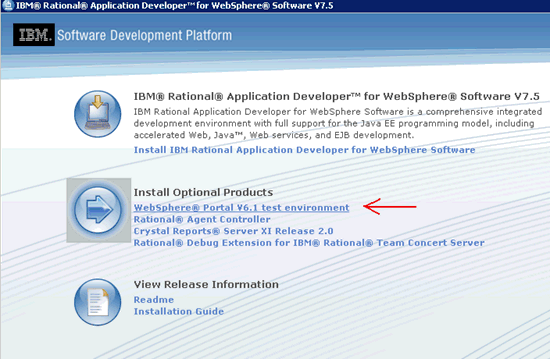
You will be prompted to insert the disk labeled "WebSphere Portal V6.1 Setup Disk1", at this point browse to the "W-Setup" directory created in Step 1 above.
See Related URLs for additional information on Portal v6.1 installation.
- You will have the option to install either the Full version or the Administration version. Administration is better suited for a test environment, see Related URL section for differences between Administration and Full installation.
- The Rational Application Developer v7.5 Programming Guide has an entire section dedicated to "Installing the WebSphere Portal v6.1 test environment".
- A link to the Passport Advantage website can be found through the Related URL section below.
Related Information
[{"Product":{"code":"SSRTLW","label":"Rational Application Developer for WebSphere Software"},"Business Unit":{"code":"BU053","label":"Cloud & Data Platform"},"Component":"Integrated Portal Test Environment","Platform":[{"code":"PF033","label":"Windows"}],"Version":"7.5;7.5.1;7.5.2;7.5.3;7.5.4;7.5.5;7.5.5.1;7.5.5.2;7.5.5.3;7.5.5.4;8.0;8.0.1;8.0.2;8.0.3","Edition":"","Line of Business":{"code":"LOB45","label":"Automation"}}]
Was this topic helpful?
Document Information
Modified date:
16 June 2018
UID
swg21330952