Troubleshooting
Problem
Creating, formatting, and reading packet traces is sometimes required to resolve problems with IBM® WebSphere® Edge Server. However, the most appropriate tool varies, depending on operating system.
Resolving The Problem
Available for multiple operating systems
Wireshark is useful and a freely available tool that can read files and capture packets on almost any operating system.
Wireshark is useful and a freely available tool that can read files and capture packets on almost any operating system.
Note: Regardless of the tool you use, be sure to validate your captures.
Do not attempt to filter data that is captured. It is better to send large network traces, which can be filtered during analysis than to risk not capturing a critical packet. For example, if a connection is failing on port 80 and the network trace captures only traffic on port 80, no ARP traffic would be captured. If the communication problem is due a machine not answering an ARP request, necessary details are not captured.
Using tcpdump on Linux®
The tcpdump program has many options and a comprehensive man page.
Retransmitted packets captured in the trace are acceptable and does not indicate a problem. Specify an interface rather than using "any" whenever possible. Certain configurations require use of the "any" interface.
The tcpdump program has many options and a comprehensive man page.
Retransmitted packets captured in the trace are acceptable and does not indicate a problem. Specify an interface rather than using "any" whenever possible. Certain configurations require use of the "any" interface.
Commonly used options:
| -i <interface_name or any> |
If one or more of these conditions applies, specify 'any' as the interface:
- a collocated server is part of the problem
- clusters are defined on multiple Ethernet interfaces
- tracing is performed on a backend server and the server is configured for MAC or encapsulated MAC forwarding.
Enables collection of on a specific interface.
When the "any" interface is specified, Ethernet headers are not captured in the packets.
|
|
| -s 0 |
|
|
| -w | Output file name. | |
| -D | Displays the available interfaces |
Example:
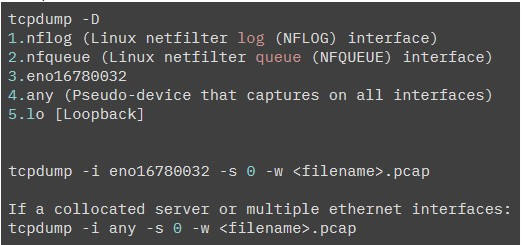
- Enter Ctrl+C to terminate the trace. The capture.pcap file produced is readable with Wireshark
- To view the contents of the capture, use the command:
- tcpdump -r capture.pcap
- Provide the binary, unformatted capture.pcap to IBM. If the trace is provided in ascii or text format, detailed analysis cannot be performed.
Commonly used options:
| -i | Network interface (all interfaces used when not present) |
| -S | Snap length (default 80 bytes; must be specified for complete analysis) |
Example:
iptrace -S 0 trace.pcap
- Special Load Balancer configuration is necessary to capture network traces while Load Balancer is running. If the additional Load Balancer configuration is not performed, the network trace does not capture expected traffic, or the Load Balancer does not forward requests. Review configuration information provided in PI84915: Packet forwarding problem on AIX.
- When iptrace is started from a command prompt, the process ID is written to the terminal, and the trace runs in the background. You need the process ID to stop the trace process. If you do not have the process ID available from when the trace was started, issue ps -ef | grep iptrace to obtain the process ID (pid).
- Stop the trace. It is important to kill the process with -15 to ensure the driver is unloaded.
ps -ef|grep iptrace
kill -15 <pid>
Trace tools such as Wireshark can read trace.pcap files created by iptrace.
Using Microsoft® Network Monitor
- Start the Network Monitor program.
- Select the interface to listen on and click start.
- Once the collection is complete, click stop.
- Save the resulting file, which can be read by the Network Monitor or Wireshark program.
Using Wireshark with Microsoft® Windows®
Wireshark is a well-known network capture tool that is freely available for Windows. You can download the software from wireshark.org. Wireshark's graphical interface is easy to use and the software contains excellent help. There are also user forums and discussions if the software on the Internet.
- Follow prompts displayed during installation. The wireshark component is the only necessary component but installing all the default components does not occupy much disk space.
- On the packet capture window, be sure to have "Install Npcap" checked. There is no need to install the USBPcap component.
- The installation program installs the npcap software for you and it is necessary to capture traffic. If you are using Windows 10, you need to ensure Npcap 1.0, or higher is installed. If it is not, download and install NpCap. Wireshark does not capture any packets on Windows 10 unless NpCap is updated to version 1.0 or higher.
- If you need to capture packets on the loopback interface, select "legacy loopback support" during the npcap installation. Do not select "Install Npcap in WinPcap API-compatible Mode"; this selection is not compatible with the load balancer.
- To start a capture:
- Start Wireshark.
- Select "Capture->Capture Interfaces".
- Select all interfaces.
- Select the "Start" button.
- To stop the capture:
- Select "Capture->Stop".
- Select "File->Save" to save the data to a file.
Using snoop on Solaris™
Example:
| -v | Include verbose output. |
| -o | Recommended: Dump in binary format. Output written to a binary file that is readable by Ethereal. |
Example:
snoop -o snoop.out
Using the nettl program on HP-UX
The nettl tool provides network trace capability on HP-UX.
The nettl tool provides network trace capability on HP-UX.
Run the command (nettl) with no arguments to view the usage.
[{"Type":"MASTER","Line of Business":{"code":"LOB45","label":"Automation"},"Business Unit":{"code":"BU059","label":"IBM Software w\/o TPS"},"Product":{"code":"SSEQTP","label":"WebSphere Application Server"},"ARM Category":[{"code":"a8m50000000CdIqAAK","label":"IBM Edge Load Balancer"}],"ARM Case Number":"","Platform":[{"code":"PF002","label":"AIX"},{"code":"PF016","label":"Linux"},{"code":"PF027","label":"Solaris"},{"code":"PF033","label":"Windows"}],"Version":"8.5.0;8.5.5;9.0.0;9.0.5"},{"Type":"MASTER","Line of Business":{"code":"LOB45","label":"Automation"},"Business Unit":{"code":"BU059","label":"IBM Software w\/o TPS"},"Product":{"code":"SSEQTJ","label":"IBM HTTP Server"},"ARM Category":[{"code":"a8m3p000000F7xiAAC","label":"IBM HTTP Server\/WebSphere Plugin-All Platforms"}],"Platform":[{"code":"PF002","label":"AIX"},{"code":"PF010","label":"HP-UX"},{"code":"PF016","label":"Linux"},{"code":"PF027","label":"Solaris"},{"code":"PF033","label":"Windows"}],"Version":"8.0.0;8.5.0;9.0.0;9.0.5"}]
Was this topic helpful?
Document Information
Modified date:
03 August 2023
UID
swg21175744